> ## Documentation Index
> Fetch the complete documentation index at: https://docs.zopio.dev/llms.txt
> Use this file to discover all available pages before exploring further.
# CLI Overview
> Introduction to the Zopio CLI tool
# Zopio CLI
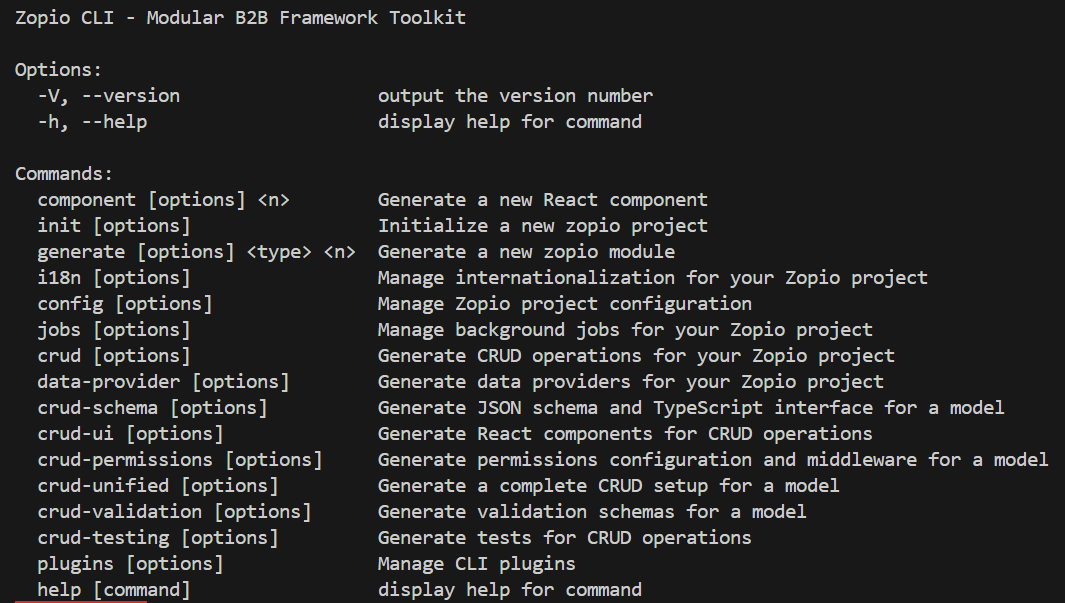 The Zopio CLI is a powerful command-line interface designed to streamline development workflows when building applications with the `zopio` framework. It provides a comprehensive set of tools for project initialization, code generation, internationalization management, and more. The CLI is now fully implemented in TypeScript for better type safety and developer experience.
## Key Features
* **Project Initialization**: Quickly bootstrap new `zopio` projects with the recommended structure
* **Code Generation**: Generate modules, components, and other code artifacts with best practices built in
* **Internationalization Support**: Manage translations and locales for your application
* **Configuration Management**: Easily configure your `zopio` projects
* **Background Jobs**: Create and manage background jobs with internationalization support
* **Plugin System**: Extend the CLI with custom plugins
* **CRUD Operations**: Generate complete CRUD functionality including schemas, UI components, validation, and tests
* **TypeScript Support**: Full TypeScript implementation for better type safety and developer experience
## Installation
```bash pnpm theme={"system"}
pnpm add -g zopio-cli
```
```bash npm theme={"system"}
npm install -g zopio-cli
```
```bash yarn theme={"system"}
yarn global add zopio-cli
```
```bash bun theme={"system"}
bun add -g zopio-cli
```
## Basic Usage
```bash theme={"system"}
# Initialize a new project
zopio init
# Generate a new component with i18n support
zopio component UserProfile --i18n
# Add a new locale
zopio i18n --add tr
# Create a new background job
zopio jobs --create user-notifications
```
## Architecture
The Zopio CLI follows a modular architecture that makes it easy to extend and customize:
```
cli/
├─ src/
│ ├─ commands/ # Command implementations
│ ├─ templates/ # Code generation templates
│ ├─ utils/ # Utility functions
│ └─ zopio.ts # Main CLI entry point
├─ package.json
└─ tsconfig.json
```
All CLI commands support the `--help` flag to display detailed usage information.
The Zopio CLI is a powerful command-line interface designed to streamline development workflows when building applications with the `zopio` framework. It provides a comprehensive set of tools for project initialization, code generation, internationalization management, and more. The CLI is now fully implemented in TypeScript for better type safety and developer experience.
## Key Features
* **Project Initialization**: Quickly bootstrap new `zopio` projects with the recommended structure
* **Code Generation**: Generate modules, components, and other code artifacts with best practices built in
* **Internationalization Support**: Manage translations and locales for your application
* **Configuration Management**: Easily configure your `zopio` projects
* **Background Jobs**: Create and manage background jobs with internationalization support
* **Plugin System**: Extend the CLI with custom plugins
* **CRUD Operations**: Generate complete CRUD functionality including schemas, UI components, validation, and tests
* **TypeScript Support**: Full TypeScript implementation for better type safety and developer experience
## Installation
```bash pnpm theme={"system"}
pnpm add -g zopio-cli
```
```bash npm theme={"system"}
npm install -g zopio-cli
```
```bash yarn theme={"system"}
yarn global add zopio-cli
```
```bash bun theme={"system"}
bun add -g zopio-cli
```
## Basic Usage
```bash theme={"system"}
# Initialize a new project
zopio init
# Generate a new component with i18n support
zopio component UserProfile --i18n
# Add a new locale
zopio i18n --add tr
# Create a new background job
zopio jobs --create user-notifications
```
## Architecture
The Zopio CLI follows a modular architecture that makes it easy to extend and customize:
```
cli/
├─ src/
│ ├─ commands/ # Command implementations
│ ├─ templates/ # Code generation templates
│ ├─ utils/ # Utility functions
│ └─ zopio.ts # Main CLI entry point
├─ package.json
└─ tsconfig.json
```
All CLI commands support the `--help` flag to display detailed usage information.